Emergency Notification System / Rave Guardian Mobile App
The University of Evansville has an Emergency Alert/Severe Weather Notification Plan. This plan is intended for the immediate transmission of specific information regarding an emergency to all affected areas of the University. It may include weather related information, school closing information, or other emergency situations requiring the securing or evacuation of the campus facilities. Emergency information is sent to students, faculty and staff through activation of the ACE Alerts Emergency System. When the ACE Alerts Emergency System is activated, notification information is sent to in the following manner: calls to campus IP phones, text messages, emails, campus housing speaker system, Visix digital signage, AlertUS desktop on campus owned computers.
Upon confirmation of a significant emergency or dangerous situation involving an immediate threat to the health or safety of students or employees occurring on the campus, the university will, without delay, and taking into account the safety or the community, determine the content of the notification and initiate the Emergency Alert/Severe Weather Notification Plan, unless the notification will, in the professional judgment of responsible authorities, compromise efforts to assist victims or to contain, respond to, or otherwise mitigate the emergency.
In the event there is a threat to the safety of the campus community, the Director of Public Safety, or his/her designee, contact the Vice President of Student Affairs, or his/her designee and the initial information is reviewed for confirmation of the threat and necessary and needed communications is determined. Upon confirmation, the appropriate methods of notification will be initiated. If the threat could extend beyond the confines of the campus, the Office of University Relations will inform the local radio and TV stations. This notification will provide specific instructions relative to the emergency including instruction to seek appropriate shelter, evacuation, or other appropriate actions. In some cases, the university may enlist the assistance of the assigned Building Safety Coordinators for each building, if necessary to expedite action.
Active Threat Siren
During an active threat (non-weather related) emergency situations, an audible tone will play over the IP Phones and the external notification systems. When the siren is heard, the campus community should consult their text messaging or email for information about the active threat. You can hear the tone below. (Note: Residence Hall sirens will sound in the event of a weather related emergency such as a tornado warning).
Audio Transcript: Siren Sounding
ACE ALERT
Sign Up for UE ACE Alert Emergency Messaging. Get emergency messages on your cell phone. Log in using your UE email address and password. You can edit your cell phone number and add an additional cell phone numbers and email addresses.
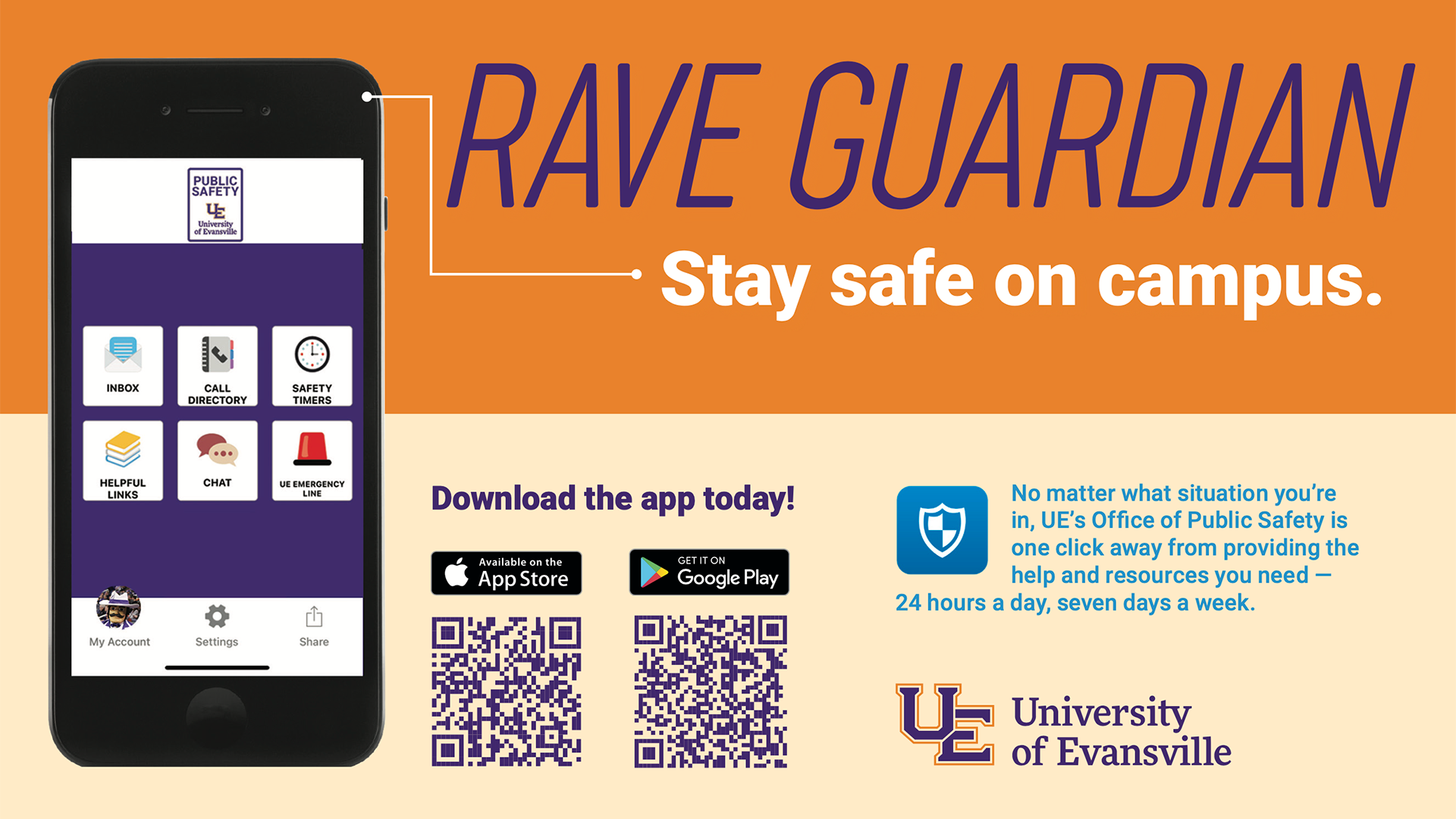
Rave Guardian, a campus safety app, transforms mobile phones into personal safety devices.
Guardian enhances safety on campus through a virtual safety network of friends, family, and the Office of Public Safety. Features include:
- UE Emergency Line: Direct immediate connection to campus safety with GPS location and personal profile information. It’s a Bluelight Emergency Phone in the palm of your hand!
- Personal Guardians: Students can identify friends, roommates, and family as ‘guardians’.
- Safety Timers: Guardians can check the status of a student. If the Rave Guardian timer is not deactivated before it expires, the selected guardian can contact Public Safety and provide the start location and end destination. Officers will check the area for the student.
- Chat: Text the Public Safety Dispatch Center at any time.
Installing the Guardian App
Installing and setting up your profile in the Guardian App is easy.
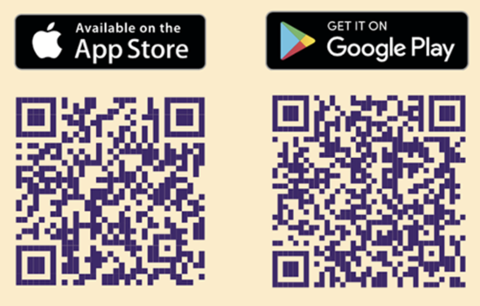
- Search for the “Rave Guardian” in the Apple App Store for iPhone or Google Play Store for Android phones. You can also scan the appropriate QR code:
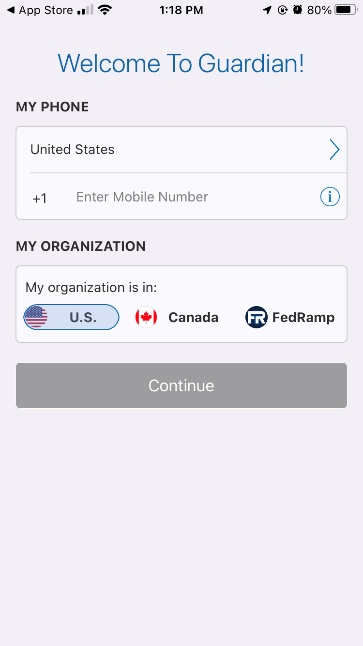
- Open the app and input your phone number (You must be registered for AceAlerts for Guardian to confirm your access and identity)
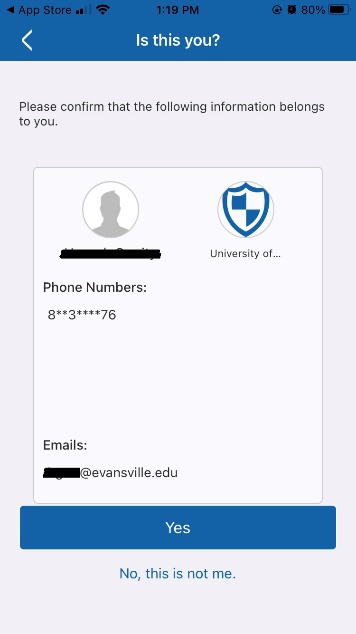
- Confirm your account
Once your account is active, complete your profile by adding your picture, emergency contact information, health information, and your vehicle information. This info will immediately be visible to the dispatcher after you contact Public Safety via the app features, helping ensure appropriate information is relayed to the responding officer.
Frequently Asked Questions
- Who can use Rave Guardian?
- Does RAVE Guardian transmit AceAlert emergency text messages?
- Is Rave Guardian always tracking me?
- Can the Office of Public Safety or the University track me whenever they want?
- Is the Office of Public Safety notified when my safety timer expires?
- Will Rave Guardian let other people like my family or friends track me?
- What if I forget to turn off my safety timer?
- Are the tips sent through Rave Guardian anonymous?
- How does my profile information get collected and sent to the Office of Public Safety?
- Is my Rave Guardian profile secure?
- Does Rave Guardian work off-campus?
- Can I still contact the Office of Public Safety if I don’t use the app?
- Does Rave Guardian work with any cell phone providers?
- Do I have to have “push notifications” turned on for the Guardian?
- Are there certain factors that can affect the location accuracy (GPS)?
- If I am no longer a University of Evansville student or employee, will my personal information still be available, and will I be able to use the Guardian service?
- Who can use Rave Guardian?
- The application is available for use by all currently registered University of Evansville students and current employees. Subscribers to the application must use a University of Evansville email address to login.
- Does RAVE Guardian transmit AceAlert emergency text messages?
- Yes. But we recommend you still enroll into AceAlert to have redundancy of receiving the messages. To register, go to www.evansville.edu/rave
- Is Rave Guardian always tracking me?
- No. Your privacy is of the utmost importance. You can only be located if you have asked for help. Rave Guardian location information is only enabled when you choose to make an emergency call or send a tip to the Office of Public Safety.
- Can the Office of Public Safety or the University track me whenever they want?
- No. Rave Guardian location information is only activated when the location setting is enabled on your smartphone.
- Is the Office of Public Safety notified when my safety timer expires?
- No. The Office of Public Safety can’t be designated as your guardian. Only someone from your personal contacts can be designated as your guardian.
- Will Rave Guardian let other people like my family or friends track me?
- Yes, if you assign “Guardians” during any individual, “timed” usage, they will have the capability to track your status. But remember that you are in full control of this feature. It only works when you program it to. You must request them as Guardians. The Guardian will receive an invitation via text with a link to download the app. They must accept you to be a Guardian. Guardians not associated with the University of Evansville are called “Social Guardians.” They will not have the UE Emergency Line or Chat features of the app.
- What if I forget to turn off my safety timer?
- When using the safety timer, the user will receive a reminder text message 5 minutes before expiring. If it expires, a message immediately goes to your chosen guardian(s) and they can call your cell phone.
- Are the tips sent through Rave Guardian anonymous?
- No. Any tips sent through Guardian will provide the sender’s information to the Office of Public Safety.
- How does my profile information get collected and sent to the Office of Public Safety?
- You will opt in for this service and provide as much information as you like during the registration process. To maximize the full benefit of this service, your user profile should contain a current photo and accurate self-description. The more information you provide in your profile, the easier it will be for officers to locate you if necessary. The only way the Office of Public Safety will be able to see any information in your personal profile is if you make an emergency call or activate the Chat feature. Personal profile information will be treated as confidential information.
Tip: The more information you provide, the more the assisting officers know if they need to assist you in an emergency. At a minimum, you should include your address (home and school), your physical description and a recent photo. If you have health issues or other personal safety concern, you can include that information as well. YOU decide what YOU provide. - Is my Rave Guardian profile secure?
- Yes. Rave Mobile Safety (the provider of Rave Guardian) uses the latest in security technologies and processes to ensure that all your information is kept secure and private. Rave also undergoes regular security audits to ensure the data is secure.
- Does Rave Guardian work off-campus?
- Yes, the Chat feature works whether you are on- or off-campus; however, if you have an emergency at an off-campus location, you should dial 9-1-1. The UE Emergency Line feature only works within 1 MILE of campus. If you send a tip that is not on campus, the information will be forwarded to an off-campus law enforcement agency.
- Can I still contact the Office of Public Safety if I don’t use the app?
- Absolutely. When on-campus, you can contact Public Safety at 812-488-2051 or use any blue light phone. You can also walk into our office, which is in the General Services Building at 1 S. Frederick St.
- Does Rave Guardian work with any cell phone providers?
- The basic profile features of Rave Guardian work on any iPhone or Android smartphone running on any U.S.-based mobile carrier network with the app installed on it. Rave Guardian can locate most smartphone devices on the AT&T, Sprint and Verizon networks. Even if Rave Guardian cannot determine your phone’s location, all other profile information will be made available to the Office of Public Safety when you use Rave Guardian.
- Do I have to have “push notifications” turned on for the Guardian?
- We recommend that you allow notification from Rave Guardian. This will alert you when your timer is about to expire, when you have received a message from the Office of Public Safety, or when someone has requested you as a Guardian.
- Are there certain factors that can affect the location accuracy (GPS)?
- Yes. Factors include but are not limited to: whether or not you are calling from inside a building or a “dead spot;” the strength of your cell signal, such as proximity of cell towers or satellites; whether or not your phone is GPS enabled and the type and quality of your phone; carrier and signal. If possible, you should provide detailed location information via text or voice. This will enable the Office of Public Safety personnel to reach you quickly when Rave Guardian is activated.
- If I am no longer a University of Evansville student or employee, will my personal information still be available, and will I be able to use the Guardian service?
- Your Guardian account remains active until you delete it.
Office Phone
812-488-2051
Office Email
security@evansville.edu
Office Location
First floor, General Services Building
